Ah, the mythical PR 1.2. N900 owners have been waiting for the official release of this software update for so long that some of us had given up any hope that it would actually see the light of day but last week, Nokia released the update which cleaned up a few things and was, overall, supposed to make my N900 that much better.
Having spent 2 hours on Friday night installing the new update, the update itself only takes about 20 minutes but I had to do a back-up first – just in case, I must admit I wish I had waited. The new update does include a few new features and widgets that are pretty cool (including an email widget which I was excited to check out) but the drawbacks are so many I’m pining for a return to the previous version of the software.
Here’s what I’ve noticed in the two days since I’ve installed PR1.2:
- Battery life is even worse than before. Admittedly I installed a few widgets that live-update and likely eat a lot of battery. I turned them all off yesterday after my battery drained in 4 hours on Saturday and though it’s better, the battery performance is still worse than it was before. Good thing I have a spare I’m now carrying around for emergencies.
- The Application Manager is gone to shit. It takes forever to load and I’m having issues uninstalling and installing new software. The uninstall feature doesn’t seem to be working at all (it won’t load any of the programs I have installed instead saying “no programs installed”) and the install feature is hit and miss sometimes loading but mostly just freezing while trying to load the download menu (I’m having Windows Vista flashbacks), forcing me to close program. Also a bummer: the search for applications feature has also disappeared, a disappointment since I use that all the time.
- The scrolling speed does seem to be improved but the applications seem to be taking longer to load.
- New night mode video feature is cool but I haven’t had too much of a chance to use it. Looking forward to the opportunity soon.
- New layout of onscreen keyboard is sweet.
- Media player is not working well. Actually, it’s being a pain in the ass. I transfer my music onto my phone in mass media storage mode which loads my N900 has a hard drive and allows me to dump my music directly into the Sounds folder. When I open the media player, it adds the new songs to the media library. That’s not happening right now. I added 100+ new songs last night which still aren’t appearing in the media library. They play when I force them to (going through the file manager and finding the song) but they’re not loading in. If that’s not bad enough, sometimes when I start the application and try to browse through the artist list, the list comes up empty. It’s frustrating as heck, especially since I’m constantly listening to music.
As it stands, the update has so far been more trouble than it’s really worth. I’m going to do a little digging to see if I can solve some of these issues but if I’m still having trouble by the weekend, be assured that I will be looking for a how to on rolling back to the previous version.
UPDATE: After a bit of online poking around, discovered that folks were having issues with certain themes and PR1.2. I reverted back to one of the pre-installed Nokia themes and voila - seems that most of my complaints are mute (except that the application installer is still slow as hell).
 It sounds really complicated and it can be but this is exactly the kind of thing that can cause non-techie people like me to run the other way. Here’s how I came to discover just what GPRS is.
Earlier this week, my mobile internet stopped working. At first, I thought it was a problem with my Rogers service and thought I’d give it a few hours to sort itself out but when I checked on it a few hours later, still no internet. I rebooted, I took out the battery and still no go. I uninstalled a couple of wifi applications that I wasn’t using thinking that perhaps something I installed messed something else up causing the trouble but still nothing. At this point, I started to worry that something inside my N900 had called it quits - not good. Thankfully, I ruled out that option by connecting to Wifi at a local Starbucks. The problem was something else.
I came home and started looking around for a possible problem. What I discovered was that my Rogers Internet connection worked through GPRS. My first thought? What the hell is that? In layman’s terms, GPRS is a service that allows data to be transferred over a voice network allowing me, the user, to access the internet over my cell phone connection. Not so complicated after all!
After a little digging, I discovered that my GPRS service had lost all its settings. I don’t know how it happened or why but after a little searching, I managed to track down the settings which I then punched into my phone and voila! Mobile internet works again!
To save you the trouble of looking around for those settings, the GPRS settings for Rogers are:
username: wapuser1
password: wap
address: internet.com
If you’re with Fido, similar information can be found here. One of the things I’ve discovered in my years of using online tech tutorials is that the steps aren’t always the same for everyone, even if the person who wrote them has the apparent same setup. I’m not sure if those Fido settings are completely accurate as I haven’t tested them but I can vouch for the Rogers settings – worked like charm!
So remember, if your mobile internet stops working, it’s not the end of the world. Probably just a minor glitch in the system!
One of the reasons I was looking for a phone with copious amounts of mass memory was for music. I have a 16GB iPod Touch I bought last year which I use for music (and very little else). When purchased, I thought I'd make use of the apps and I have downloaded and even purchased a number of apps but I find I mostly use it for music. The hitch is that when I'm plugged in, which is pretty much at all times when someone's not with me and I'm in travel (at least 3 hours a day) I can't hear my phone right. The N95 does have a built in music player but with only 8GB internal memory and no expansion slot, it's simply not big enough for my daily use (don't laugh). That said, I have occasionally used it and it does work great.
One of the things I had to get working on the N900 was the music player but there were a few glitches. We have an exterior hardrive connected to our network via our router with 100+ GB of music. In a desperate attempt to get things to work, I installed the OVI Music Player but the problem here is that it was taking for-ever to populate the library. The other problem: Windows 7 wasn't detecting the device as mass storage which meant that some of the other music management software out there didn't detect it as a drive for me to drop music in. I tried Double Twist, Songbird and my trusty J. River Media Jukebox (which, if you haven't checked out you really should - it's a powerful app and completely free) before finally giving up for the day.
I did some more research and reading and thought I was ready for action when something in Windows 7 clicked and when I plugged the phone in as a mass storage device on Friday, Windows actually detected it and let me transfer music over. I created a file in the main directory called Music and started transferring files over. I'd read somewhere that the internal software on the N900 wouldn't read folders but after a few tests, I discovered that that's not true and indeed, the software does actually read through folders though take note, it only organizes by meta data so make sure your music is properly tagged.
I found that for the media player to find the music in the new folder I created, I first had to use the phone's file system to navigate to my newly created "Music" folder and picked a song to pay. The media player then detected the rest of the music and I haven't had to navigate there again - the library automatically detects newly added music.
This is the sleek media player window that comes up when you launch the application:
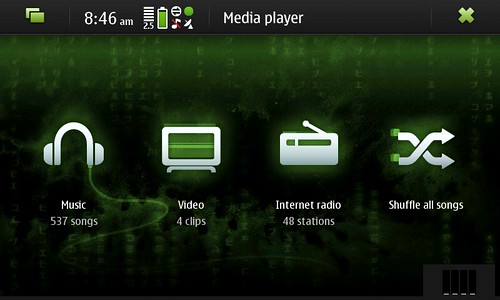
It's very sleek.
This is a shot of the music library. I think it automatically detects images as album covers but I haven't figured out that bit yet - yes, I'm a little anal about my album covers.
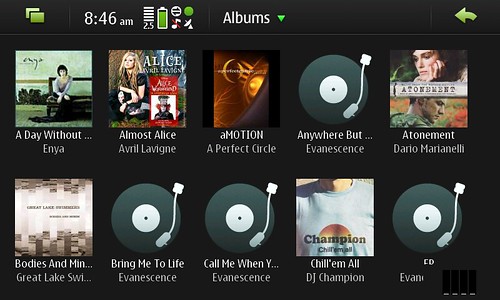
I think there may be other viewing options available (like a list view) but I haven't checked those out yet). There's also the option to create playlists on the go and add music to a "now playing" sort of queue, something which I loved on the Zune but which the iTouch is lacking.
This is the "Now Playing" screen:
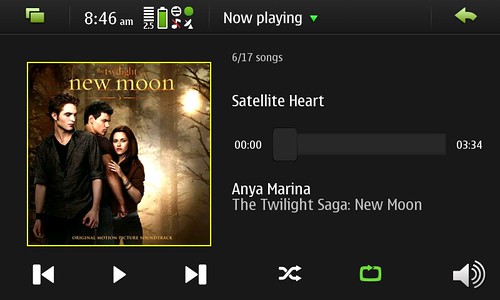
If you're multitasking or simply want quickly restart your music (if, for example, you paused it or it was paused by an incoming answered call or something), you can do so from the desktop. I have a little widget sitting on the left hand side of my first desktop:
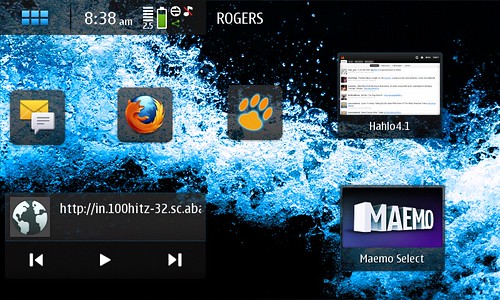
Other great bonuses is internet radio and I think the phone also has a built in FM transmitter that I have yet to explore.
The other major hurdle to jump was music tracking. I live by
Last.fm and had to figure out how to get it to work (hence why I was so eager to use either Songbird or Media Jukebox, both of which have scrobblers) but the N900 has one better: instant
scrobbling. Let me explain.
A scrobbler is a little program that runs with your software (there are a bunch of versions for various mp3 players and desktop applications including one for iTunes though lately I'be been having quite a bit of trouble with the iTunes plugin). A wonderful developer by the name of
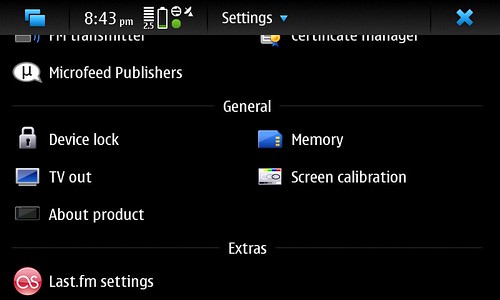
Claudio Saavedra went ahead and built a Last.fm scrobbler. Once installed it's activated from the phone's "Settings" menu. You add your username and password and voila! You're set to go! The scrobbler uses the internet connection to automatically update your Last.fm account in real time. It's a sweet sweet set-up!
That's right folks! First post directly from the N900 using an application called MaStory!
Just for fun, and to see if it actually works, here's a picture too!


