Good things are not a-brewing. According to a recent story at
Podcasting News, it looks like sooner rather than later the Zune will no longer be “just” a Zune. Looks like Microsoft could be unveiling a new product which would combine the Zune music player with the Danger Sidekick phones. The result? A device that would act more like a iPod than a Zune. On the one hand, I’m happy to see the competition but on the other, I love my Zune too much to even bare the idea of not being able to replace it down the line.
I’m hopeful that by the time I do need a replacement, the price on this fancy new device has lowered significantly or even better, that Microsoft follows Apple and provides a version of the player which doesn’t have the phone capability (I love my N95 thank-you-very-much).
It’ll be interesting to see how this unfolds. For now, you can read all of the speculation over at Podcasting News and then maybe even head over to
Zunescene for some concept art. At least we don’t have long to wait. The announcement, if there is one, will be made at the
Consumer Electronics Show on January 7th.
Or so we hope.
Learning something new is never easy but a wrench is thrown in when that something new has quirks.
I’m not an expert in computer technology but from my experience, Vista was a bit of a disaster. We held back upgrading our PCs at home and hubby only migrated over when he had to (for work purposes). At the office, we have 3 PCs running Vista and for the most part, they work great. It’s the compatibility that sucks the big one. My biggest issue at the office is the fact that previous versions of Outlook don’t work correctly which means for at least one computer in the office, we had to unload $300 for a copy of Office 2007.
The biggest complaints I’ve heard are that it’s slow and for those used to previous versions of Windows, hard to get used to. I can see that – the menus are different, settings are located in different places and even I’m still getting used to a few of the changes. There are a couple of nice upgrades – notably the Media Center software which allows you to connect all of your Microsoft devices together (PC, Xbox and Zune). Did the Vista release bomb? I don’t think so but I’m pretty sure the transition wasn’t as smooth as Microsoft would have liked.
So what do the geniuses at Microsoft do? They start working on a new release. I haven’t been following this too closely but
Windows 7 is coming and according to
Lifehacker, it’s coming very soon: by midyear 2009 and pre-bundled with PCs for the 2009 holiday shoppers.
Again, I haven’t been tracking the updates and of
all I’ve seen, the coolest is the
Apple-like dock menu.
I’m actually looking forward to hubby getting his hands on a test copy (being a computer tech has its perks). The thing won’t run on my little laptop but I’d love to see how it handles on our home/media PC.
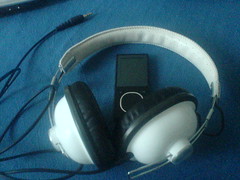 I'd been remiss to upgrade my Zune software as soon as it was launched last weekend but Saturday night, while waiting for dinner to cook, and having read some great feedback about the new features included in the Zune 3.0 update, I decided to upgrade.
I downloaded the software and installed it without a glitch (other than the fact that the new software didn't import my Podcasts - bugger), the firmware upgraded with no problems and without deleting everything from my player (BONUS) but I noticed that the Marketplace link was missing from the software. I thought that perhaps I'd had a glitch during the install so I re-installed it and still, no Marketplace tab. WTF? After a little research, I discovered that the new Marketplace, which features some of the best and cool new Zune upgrades, is not available to Canadians. Saddly, what this also means is that aside from not being able to purchase any music, I'm also not allowed to subscibe to podcasts or check out any of the cool free features. Disappointing. Yeah, I can still subscribe to the podcasts but not from the Marketplace which means discovering new music/shows, something which the Zune is getting great points for, is useless to me.
I'm really disappointed by this development but am hopeful that maybe, just maybe, they'll solve this problem soon by giving Canadians a version of the software. That major disappointment aside, I am liking the social aspect of the software which lets me be buddies with people, see what they're listening to and, if the Marketplace thing was working, I'd also be able to check out recommendations based on what I'm listening to. Basically, the same thing that Last.fm does for iTunes except already integrated into the Zune Social community.
I've also updated the sidebar with a "Listening To" widget that shows you exactly what I've listened to since I last synched my Zune!
UPDATE: Just upgraded the Zune software as prompted through the software rather than a clean download and no only did the upgrade not erase my podcasts, it also installed the Marketplace. WTF?
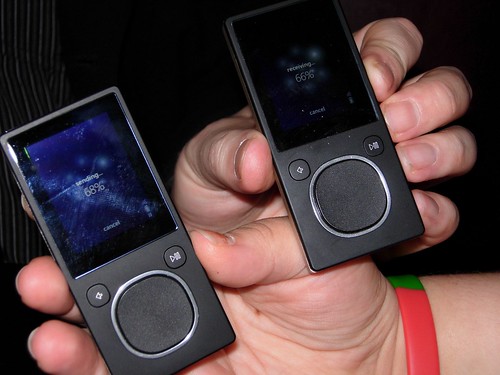
I love my Zune. I love my Zune so much I haven't bothered to go back to my iPod. I still have it but it's being used by hubby in the car - when he actually remembers to take it with him.
The folks at
Podcasting News have some information on the recent upgrades to the Zune and the Zune firmware and though they're not all that impressed with the major announcement of the radio channels, I'm not quite so down on Microsoft. Bottom line, I don't use the radio feature all that often but am thrilled that I have that option if I ever
do want to use it.
That said, the radio is the least of the updates I care about. The one that caught my eye is that users can now access the Zune Marketplace music store directly from their device when they are in a recognized Wi-Fi hot spot, or through a home wireless network. It's not a huge upgrade I realize, especially for me who hasn't bought any music from the marketplace yet, but it's a step in the right direction. What I didn't see on the list that would be great to do now would be to set up the marketplace to also take credit card payments because at it stands now, I have to buy a Microsoft Card for Credits that can then be exchanged for the mucis/tv - much like the XBox Marketplace.
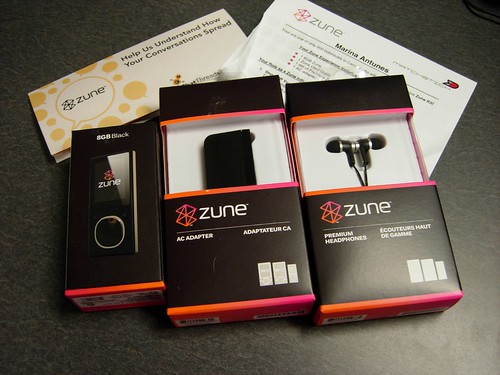
So my new mp3 player arrived last week. Along with the player itself, the Matchstick folks also sent along an AC adapter (handy!) and the premium headphones. The first thing I did: unbox all the little tidbits and install the software. I still haven't tried the headphones but they'll come up in a later installment I'm sure.
My laptop, which acts as my main PC is pretty handy but it's a bit on the slow side so while installing the software, I decided I needed to do some more work so I brought my Eee in for action.
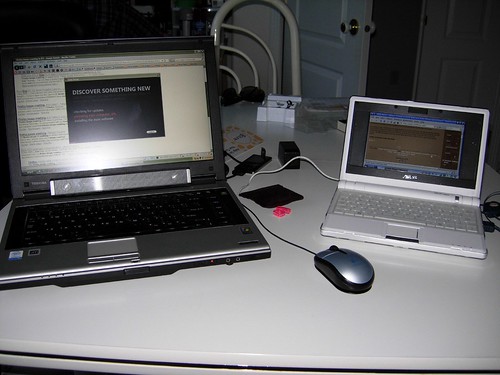
The install of the software itself had a few speedbumps. For some reason, my last WindowsXP update didn't work quite 100% and after a bit of hair pulling, I decided to reboot. That seemed to fix the problem and the software installed without a glitch. I'm pretty impressed with the install. The Zune software migrated in all of my music, along with the podcast feeds from iTunes so I was set to go from the beginning. I had a minor freakout when the player wouldn't turn on. I figured it would come partially charged as most of these things do but not this one. I had to charge it before I could actually check it out.
It sat on the counter for 2 hours charging at which point I checked started my first sync. First things first, I deleted all of the pre-loaded material and started adding music, podcasts and a few photos. The software is fairly intuitive and I didn't have to read any of the instructions on how to use it.
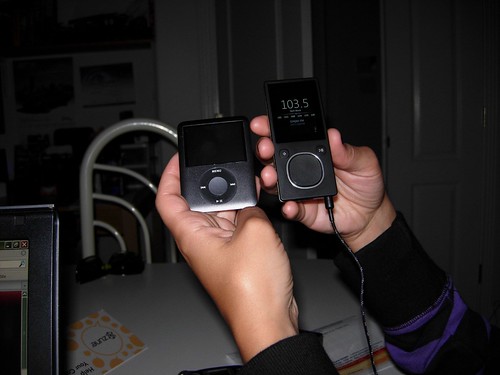
The player itself is pretty nifty. It's a little longer than my iPod but now that I've been using it for a few days, I admit I like the shape of it. It fits nicely into my hand when I'm walking though it's taken a bit of getting used to not being able to squeeze it into some of my pockets - mostly my fault because I'm using some fairly big headphones with a large headphone jack plug.
The other thing I did almost immediately was set up the software at work. I refused to do this with my iPod because iTunes seems to slow down the computers when I run it and the sync on multiple computers has always been a bit troublesome for me. The Zune was no problem. I've added all of my podcasts and set up my Zune as a guest device which lets me add the downloaded shows without losing any of the data already on the device. Very nice.
I'm really liking the basic usages of the device. It's doing all I was doing with my iPod and more than that, I'm able to listen to the radio too. I still haven't tested any of the more advanced settings like uploading video or photos or trying the wireless sync but for the time being, I'm a pretty happy and impressed camper.

A few weeks ago I was approached by the folks at Matchstick, a marketing company specializing in word of mouth marketing. Surprisingly, I'd heard about them through word of mouth, specifically, via local blogger extraordinarie Miss 604. They asked if I'd be interested in filling out a questionare to see if I qualified for an mp3 offer. I took a few minutes, filled it our and a few days later I was contacted via telephone for a few other questions. To make long matters short, I qualified for the offer and was the new owner of a Microsoft Zune. Sweet.
I came home that night and did a bunch of research comparing my current mp3 player, a third generation iPod Nano 8Gb with the Zune 8Gb player I would be getting in the mail. Checking the specs, the two are not that much different. Here are a few of the important ones, side by side:
| Spec | iPod | Zune |
| Weight | 1.74oz | 1.7oz. |
| Display | 2-inch (diagonal) | 1.8-inch (diagonal-music; horizontal-pictures & video) |
| Resolution | 320 pixels x 240 pixels | 320 pixels x 240 pixels |
| Playback Time | Music-Up to 24hrs on full charge; Video-Up to 5hrs on full charge | Music-Up to 24hrs on full charge; Video-Up to 4hrs on full charge |
| Charge Time | 1.5hrs (80%); 3hrs for full charge | 2hrs (90%); 3hrs for full charge |
| Radio | Not included (extra) | Built-in |
| Wireless | Not included | Built-in (up to 30ft range) |
On specs alone, the players are pretty much identical though the Zune is slightly longer than the iPod. The size difference is minimal and when you consider that the Zune also has a wireless sync option and the built in radio while they both cost about the same...the Zune seems to be the better of the two. Where on earth was this player when I was shopping for a replacement last year after the death of my Sansa?
More info to come. For now, let's just say I'm ready to start playing!

My Access assignment which is due tonight took MUCH longer to complete than I anticipated, largely in part to the fact that the wonderful professor decided to use the most difficult of the Office applications to test our ability to adapt and as a result, much of the material which I had to finish last night were things that were not explicitly covered in class and which required a little research. I finally printed the last bit of the assignment at nearly 4AM. Considering that at that point I was only going to get a few hours of sleep before having to get up again, I buckled down and edited the new show. My thought was - go through the pain today and come home tonight and straight to bed. At least that's the plan!
A few weeks back I registered for an upcoming free event titled Bridging Media: Addressing The Challenges. I registered on a whim and nearly forgot about it until Dale mentioned it yesterday. I was waffling whether to go or not but I promised to look over the schedule of happenings and now that I've reviewed it, I'm definitely planning to attend. Not only do the sessions sound like they could be of particular interest to me but I'm curious to meet a few of the attendees, particularly Graham Fortin of Movie Set. This could definitely be a great opportunity to build some local contacts.
On a more sombre note, last night I discovered that Enrique Manuel "Rick" Marques, the disabled man found dead in his home the other day, is actually a relation of ours through marriage. I knew Rick only a little (through a cousin). My warm condolences go out to his family.


